
AI Model Brand Ad Generator
Create realistic giant-scale AI model brand ads with Gemini & Google Flow
Preview Image
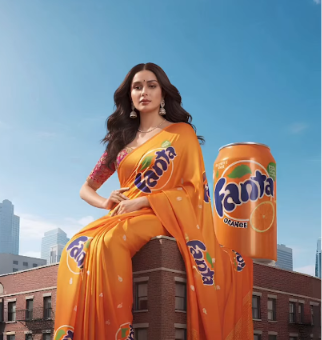
1st Prompt (Image Prompt - Google Gemini)
Hyper-realistic cinematic photo featuring an AI-generated Indian female model sitting naturally on the front rooftop edge of a small-to-medium city intersection brand-new building, captured from a high angle, looking downward from a high-to-low angle toward the rooftop.

The uploaded product image appears just beside her on the same rooftop, similar height to the model, maintaining perfect proportions, with realistic lighting, reflections, and shadows that perfectly match the environment.

The model's saree is designed using the product's gradient colors and fully covered with the uploaded product logo and icons in a premium designer pattern, flowing naturally downward with gravity and a gentle breeze.

The building should not be too tall—just enough to highlight the giant scale of the model against the city skyline.

Below, show a busy Indian intersection (chauraha) with visible cars, bikes, pedestrians, and road markings to enhance scale and realism.

The skyline, nearby buildings, and bright daylight enhance the cinematic depth and perspective.

The AI-generated model maintains direct eye contact with the camera, exuding elegance and confidence.

Lighting: Natural daylight—soft yet bright, with crisp contrast and realistic shadows.

Mood & Style:

Ultra-realistic
Cinematic
Giant Scale
Small Building
High-to-low Angle
City Intersection
Heroic Perspective

Camera Setup:

Angle — High-to-low
Front downward tilt
2nd Prompt (Video Prompt - Google Flow)
Animate the uploaded image with a still camera. The giant woman stays completely still, keeping eye contact with the camera and a soft smile. Her saree moves gently in the breeze, and cars and people below move naturally in daylight, creating a cinematic, realistic brand ad feel.
Steps
- 1Go to Google Gemini and upload your product image
- 2Copy and paste the 1st prompt (Image Prompt)
- 3Open Google Flow and upload your generated image
- 4Copy and paste the 2nd prompt (Video Prompt)
- 5Boom — your realistic model ad is ready!